
Order Bumps: How They Work at Checkout
You’ve decided to buy an online workshop for $27. You click the button, head to the checkout page and start filling in your details. Before you pay, you notice a small option that says: Add the Positioning Workbook for $7. You can add it to your purchase or just continue without it.
That extra offer is called an order bump. Order bumps are commonly used in sales funnels and online checkouts, but if you’re unfamiliar with the term, you might be wondering what exactly counts as an order bump and how it’s different from other offers like an upsell or OTO. So, let’s go through what an order bump is, where it appears, how it works and where it fits into the buying process.
What Is an Order Bump?
An order bump is an optional additional offer shown to someone during checkout, before they complete their original purchase. It usually appears somewhere on the checkout page as a checkbox, small offer box, toggle or button that lets the customer add something else to their order.
The important part is when it appears. When someone sees an order bump, they haven’t completed their original purchase yet. They’re still checking out and the order bump gives them the option to add something else to that same purchase. For example, if you’re already buying a $27 workshop and see an option to add a $7 workbook, you’re deciding: “I’m buying the workshop. Do I want to add the workbook too?” If you add it, both become part of the order you’re about to pay for. If you don’t, you continue buying the workshop on its own.
Where Does an Order Bump Appear in a Sales Funnel?
An order bump normally appears on the same checkout page you’re using to complete your purchase. A simple sales funnel with an order bump could look like this:
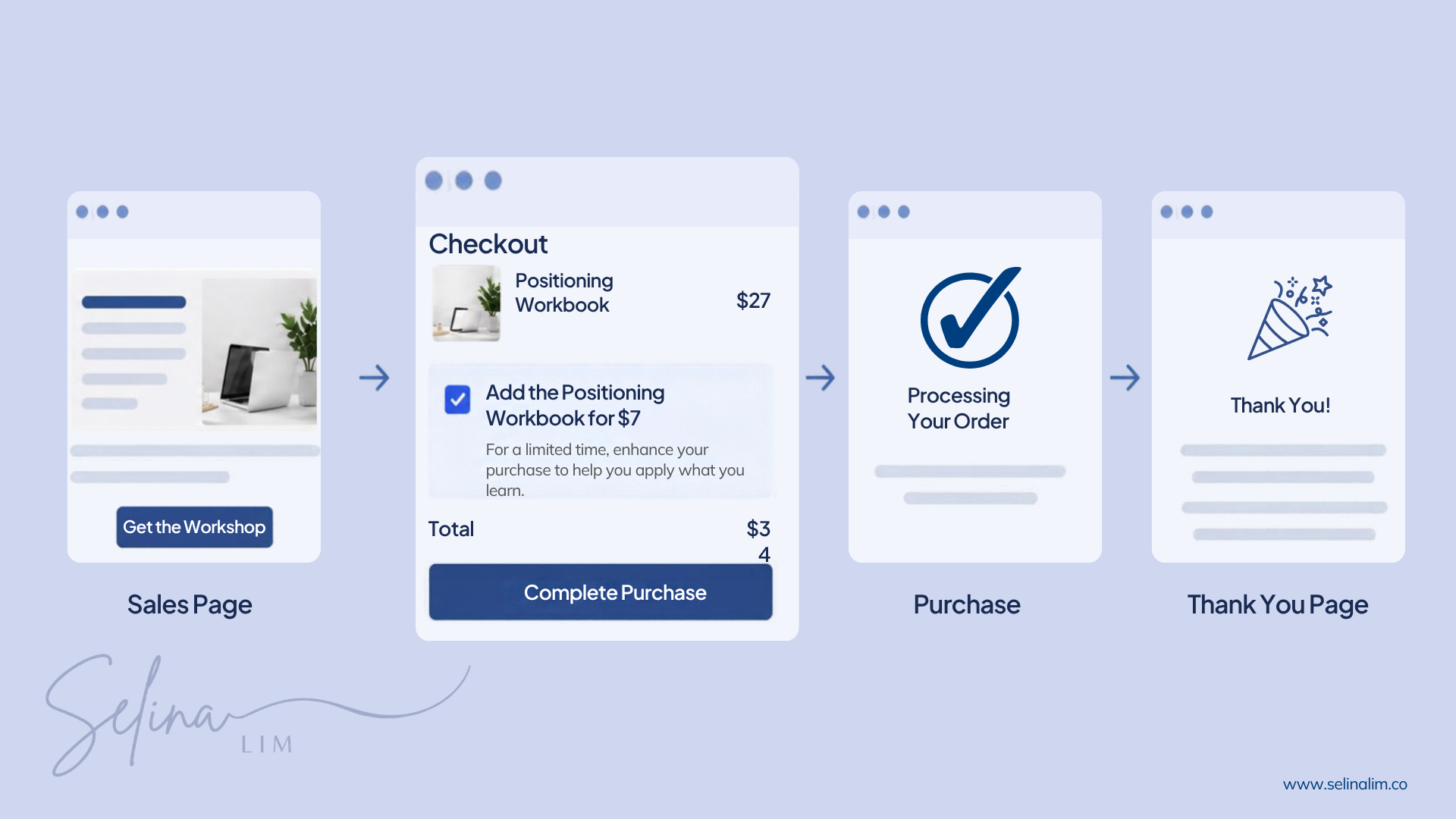
The customer first visits your sales page and decides they want to buy your main offer. They then move to the checkout page to enter their details and make payment. This is where they see the order bump.
For example, if someone is buying a $27 Positioning Workshop, they might see a checkbox during checkout to add a $7 Positioning Workbook. They can tick the box to add it or continue with just the workshop. The order bump isn’t another full sales page that someone has to visit. It appears as part of the checkout itself.
How Does an Order Bump Work?
Let’s use the same example. Someone wants to buy your $27 Positioning Workshop. They click through to the checkout page and see an option to add the Positioning Workbook for $7.
If they choose to add the workbook, it becomes part of the same order:
Item | Price |
|---|---|
Positioning Workshop | $27 |
Positioning Workbook | $7 |
Total | $34 |
Instead of paying $27 for just the workshop, they pay $34 for both. If they don’t want the workbook, they leave the option unticked and continue paying $27 for the workshop.
That’s an important part of an order bump: it’s optional. Someone shouldn’t have to add the extra item in order to purchase your main offer.
Why Do Businesses Use Order Bumps?
Businesses use order bumps to give customers the option to add something relevant to what they’re already buying. If someone is buying a workshop, they may also find a workbook useful. If they’re buying a physical product, maybe there's an accessory that goes well with it.
There’s also a benefit for the business. When some customers choose the additional item, it increases the average order value, which is the average amount customers spend on each order. But that doesn’t mean you should add another product to checkout just to get someone to spend more. The additional offer should still be related to what the customer is already buying.
What Makes a Good Order Bump?
A good order bump should have a clear connection to the main purchase. The customer shouldn’t have to stop and figure out why you’re offering it to them.
If someone is buying... | An order bump could be... |
|---|---|
An online course | Workbook or templates |
A workshop | Workbook or notes |
A digital guide | Checklist or toolkit |
A physical product | Related accessory |
A service | Additional consultation |
A software or digital product | Relevant additional feature or resource |
For example, someone buying a website audit might find an additional consultation useful because they can go through the findings and ask questions about what to do next. But if you’re offering a productivity ebook that has nothing to do with the website audit, the customer may not understand why it’s being offered to them at checkout.
When choosing an order bump, look at what the customer is already buying and what else could be useful alongside it. It could be something that helps them use what they bought, apply it or get more out of it. If there’s a clear connection between the two, it could work as an order bump.
What Does an Order Bump Look Like?
An order bump can be quite simple. Let’s say the customer is buying your $27 Positioning Workshop. On the checkout page, they might see:
☐ Add the Positioning Workbook for $7
A printable workbook with exercises you can complete as you go through the workshop.
The customer journey would look like this:
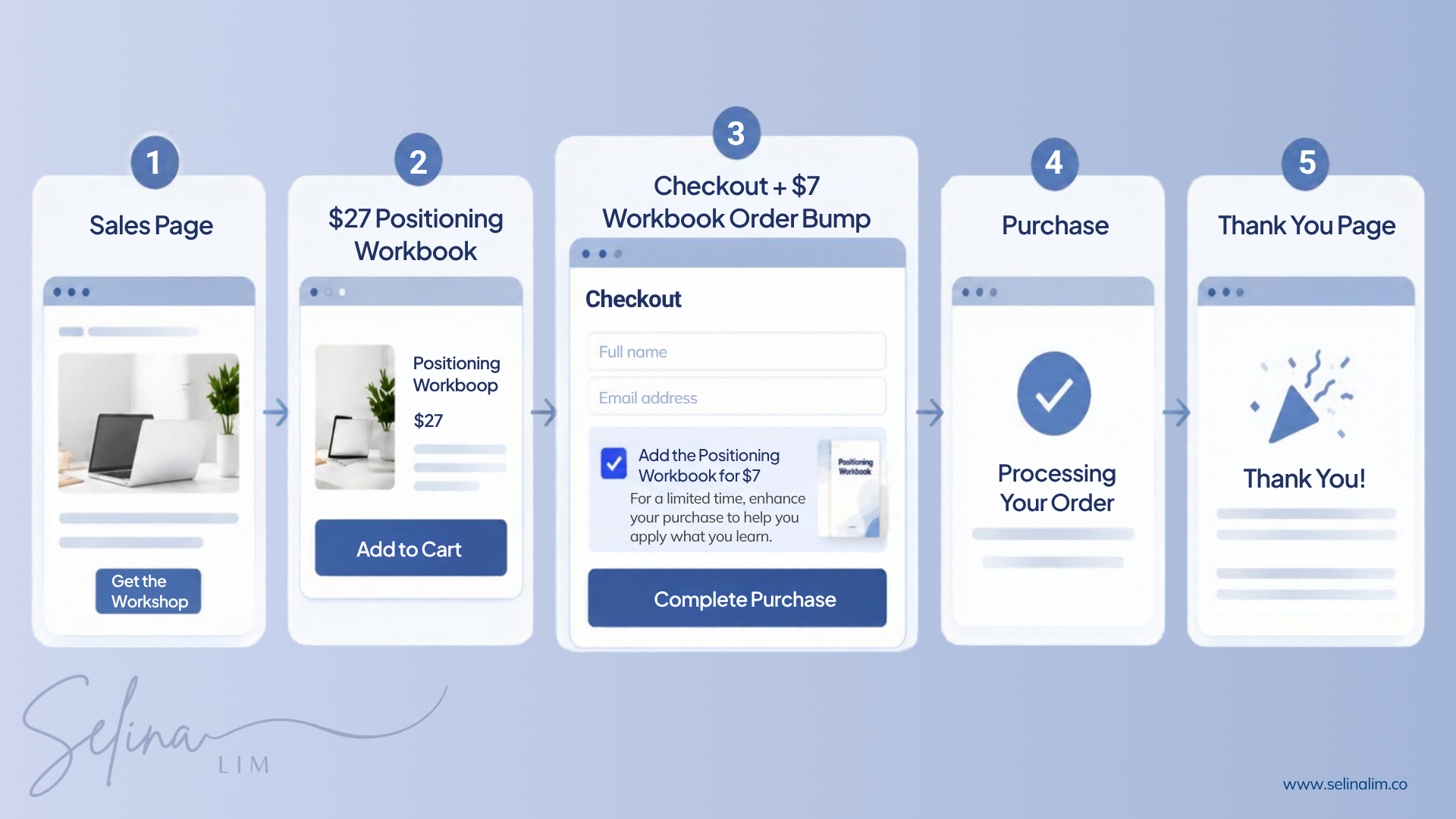
If they tick the box, the workbook is added and their total becomes $34. If they leave it unticked, they continue paying $27 for the workshop.
I'm Still Confused Between an Order Bump and a One-Time Offer (OTO)
Order bumps and OTOs are both additional offers, which is why they can be easy to confuse. The easiest way to understand the difference is to look at whether the customer has completed their original purchase yet.
You can think of an order bump as: “I’m buying this. Do I want to add this too?” The customer is still at checkout and anything they add becomes part of the purchase they’re about to make.
An OTO (one-time offer) happens after the original purchase has been completed. For example, the customer pays $27 for the Positioning Workshop first. After payment, they’re taken to another page that offers them a $77 Positioning Review Session. Whether they accept or decline the review session doesn’t change the $27 purchase they’ve already made.
You can think of an OTO as: “I’ve bought this. Do I also want to buy that?”
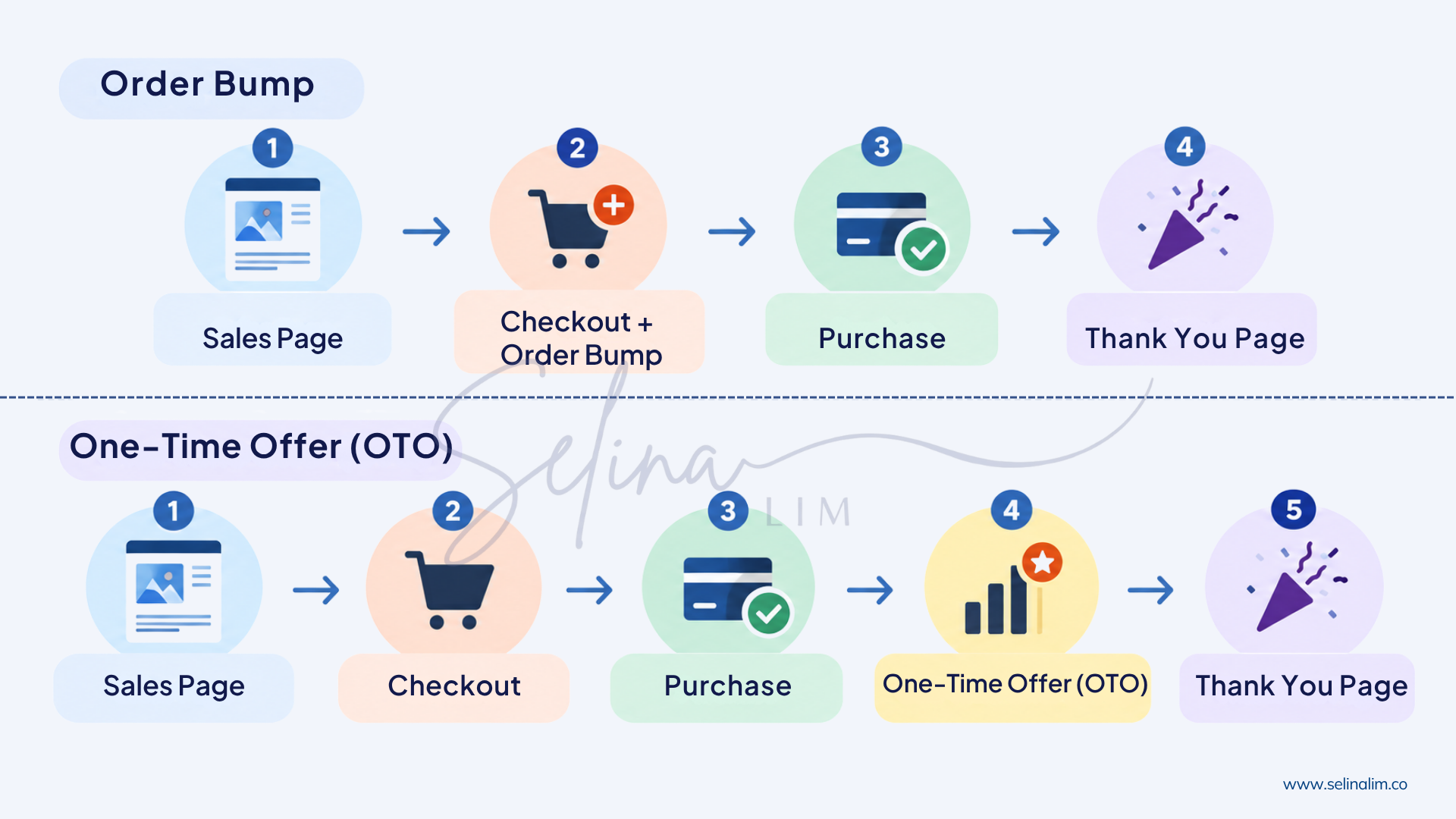
The two customer journeys would look like this:
Order Bump | OTO | |
|---|---|---|
What is happening? | Adding something to the current purchase | Being presented with another offer after the original purchase |
When does it appear? | During checkout | After the original purchase |
Has the customer paid for the main offer? | No | Yes |
Example | Add a $7 workbook to a $27 workshop | Buy a $77 review session after purchasing the workshop |
So the difference isn’t necessarily what you’re selling. It’s where the additional offer appears in the buying process. If someone is still checking out and can add something to the purchase they’re currently making, that’s an order bump. If they’ve already completed their purchase and are then shown another offer, that’s an OTO, or one-time offer.
You can also have both in the same funnel. Someone could add the $7 workbook as an order bump, complete their purchase, and then be shown the $77 Positioning Review Session as an OTO.
How About an Order Bump and Upsell? Are They the Same Thing?
This is where the terminology can get a little confusing because different marketers and platforms don’t always use these terms in exactly the same way. Upsell is often used as a broader term for an additional offer that encourages a customer to spend more. Depending on the platform, you might see the word used for an offer during checkout, after checkout or as an upgrade to a more expensive version of a product.
An order bump is more specific. It generally refers to an optional additional offer shown during checkout before the customer completes their purchase. So rather than focusing too much on what a particular platform calls something, look at what’s actually happening. If the customer is adding something to the purchase they’re currently checking out with, you’re generally looking at an order bump.
Looking at an Order Bump From Your Customer’s Point of View
Just because your checkout allows you to add an order bump doesn’t mean you need to put one there. Your customer has already decided to buy something from you and is now at checkout ready to pay. If you introduce another offer at this point, it should be relevant to what they’re already buying.
The customer should be able to quickly understand what the additional offer is, why it could be useful, how much extra it costs and that it’s optional. You also don’t want to add too many offers or information to the checkout. If there’s too much for the customer to read or decide on, you could make the checkout more confusing and even lose a customer who was already ready to buy.
An order bump should add something useful to the purchase without making the checkout unnecessarily complicated.
So, Do You Need an Order Bump?
No. Not every checkout needs one. An order bump can be useful when you already have something that goes well with what the customer is buying. For example, if you’re selling a workshop and also have a workbook they can use during the workshop, you could offer the workbook as an order bump.

But you don’t need to create another product just because your checkout has an order bump feature. Start with what you’re already selling and see if there’s something useful you could offer alongside it. If there isn’t, that’s okay too. A simple checkout that lets someone quickly pay for what they came to buy can work perfectly fine on its own.
Frequently Asked Questions About Order Bumps
What Is an Order Bump in Marketing?
An order bump is an optional additional offer shown during checkout. A customer can choose to add it to the purchase they’re already making before they complete payment.
Where Does an Order Bump Appear?
An order bump normally appears on the checkout page before the customer completes their original purchase. It might appear near the order summary, payment details or payment button.
What’s the Difference Between an Order Bump and an OTO?
An order bump lets someone add something to the purchase they’re currently making before they pay. An OTO is another offer presented after the original purchase has already been completed.
A simple way to remember the difference is:
Order bump = “add this to my order”, while
OTO = “I’ve bought that, do I also want this?”
What’s the Difference Between an Order Bump and an Upsell?
“Upsell” can be used as a broader term for different types of additional offers. An order bump more specifically refers to an optional add-on shown during checkout before payment.
What Should I Offer as an Order Bump?
Something that has a clear connection to the main purchase. It could be a workbook for a course, an accessory for a physical product or an additional consultation for a service. Whatever you choose, it should be something that would be useful alongside what the customer is already buying.
How Much Should an Order Bump Cost?
There’s no single price that an order bump has to be. It depends on your main offer, what the additional item is worth and the context of the purchase. Rather than following a fixed percentage or formula, the price should reflect the value of what you’re offering.
Can You Have More Than One Order Bump?
Some checkout platforms allow you to add more than one. But each additional offer gives the customer another decision to make, so more order bumps don’t necessarily make the checkout better.
Does Every Checkout Need an Order Bump?
No. If you have a relevant additional offer that complements the main purchase, an order bump may be useful. If you don’t, there’s nothing wrong with keeping the checkout simple.


